
How to Audit a B2B Ecommerce Website for Conversion Problems: A Step-by-Step Guide
Auditing a B2B ecommerce site is different from checking a consumer store for a smoother checkout button. B2B buyers often need pricing context, product documentation, internal approval, and a low-risk way to request a quote before they move forward.
That is why how to audit a B2B ecommerce website for conversion problems starts with one question: where are qualified buyers losing confidence, getting stuck, or being pushed into a buying path that does not match how their company purchases?
This guide shows you how to run a B2B ecommerce CRO audit in three phases: Discover what is happening, Diagnose why buyers hesitate, and Decide which fixes deserve attention first. Look for the problems that block real business buying: unclear pricing guidance, weak RFQ paths, missing specs, account setup barriers, approval-workflow problems, poor reordering, and checkout options that do not support purchase orders or payment terms.
SiteTuners has worked on conversion problems since 2002 and has helped more than 2,100 clients.
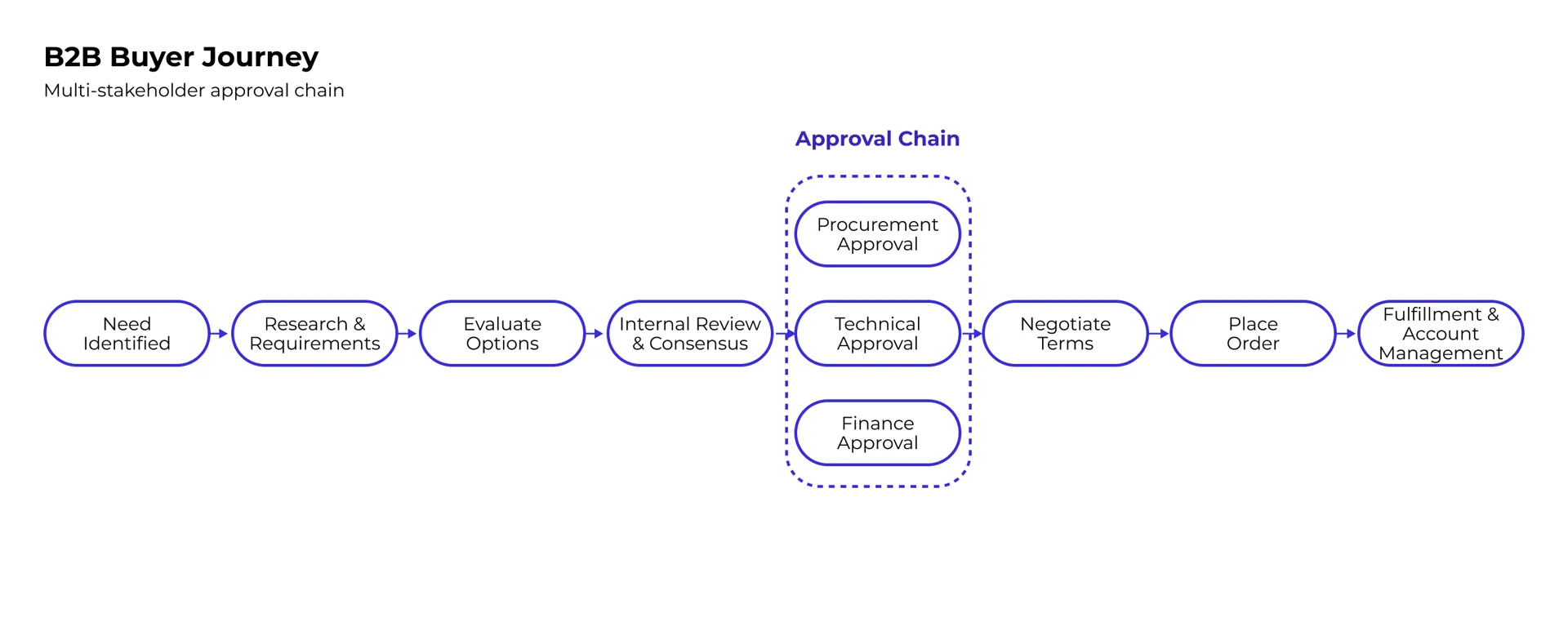
Common Bottlenecks in B2B Digital Storefronts
Start by looking for friction that affects high-intent buyers:
- Gated Catalogs and Hidden Pricing: If buyers cannot see enough product or pricing context to decide whether you are a fit, they may never reach out.
- Long Request for Quote Forms: Count the required fields before a buyer gets a response. If the form asks for details sales can collect later, mark it as a friction candidate.
- Weak Quote-Builder Paths: Buyers should be able to add products, compare options, save quotes, and share them with stakeholders.
- Manual Approval Workflows: If buyers cannot manage team permissions, purchase approvals, or account roles on their own, deals can stall.
- Limited B2B Payment Options: Purchase orders, account-based terms, ACH, and Net payment terms often matter more in B2B than credit-card-only checkout.
- Weak Mobile Experience: Field buyers, sales reps, and job-site managers may research products or reorder from a phone.
If the problem is broader than one page, a structured look at why conversion rates are low can help separate traffic-quality issues from on-site buying friction.
Key KPIs and Metrics for B2B CRO
A simple sitewide ecommerce conversion rate does not tell the full story in B2B. One quote request, saved cart, or reorder may represent a valuable account, so separate business outcomes from smaller intent signals.
Use a simple hierarchy:
- Primary conversion signals: RFQ conversion rate, demo requests, completed purchases, qualified leads, reorder activity, and pipeline value.
- Secondary intent signals: Quote-builder adds, saved quotes, quote shares, account-registration starts, spec-sheet downloads, visits to integration pages, and saved carts.
- Friction signals: Form starts without submissions, form errors, checkout abandonment, failed searches, repeated filter use, rage clicks, low scroll depth on important product pages, and account-login loops.
Do not treat every metric as equally important. In a B2B conversion rate optimization audit, a small drop in RFQ quality, lead value, or reorder completion can matter more than a large swing in a low-intent micro-conversion. Look for movement that lines up with business impact: fewer qualified quote requests, fewer high-value saved carts, lower lead quality, or more drop-off in a step that sales depends on.
A website funnel analysis can help connect those drop-offs to specific pages, forms, or buying paths.
How to Audit a B2B Ecommerce Website for Conversion Problems Step-by-Step
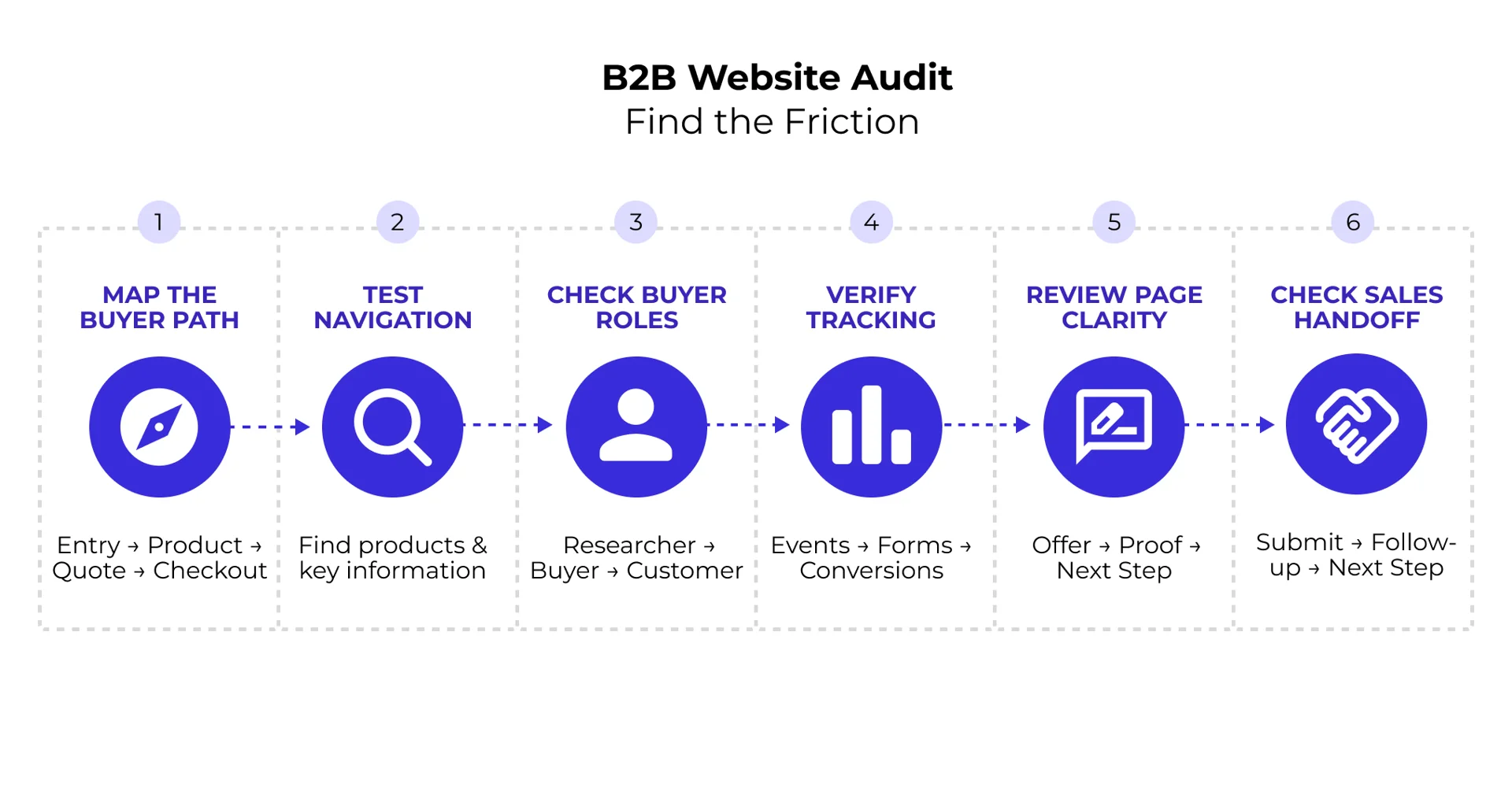
A strong B2B ecommerce CRO audit separates three jobs: Discover, Diagnose, and Decide. If you jump from a heatmap to a redesign, you may fix the loudest-looking issue instead of the issue that blocks revenue.
Use analytics first to see where buyers drop off. Then use behavior tools, surveys, and sales feedback to understand why. Only after that should you rank changes and decide what to test, fix, or monitor.
Essential Steps to Audit a B2B Ecommerce Website for Conversion Problems
Use this practical audit path:
- Discover the current buyer path: In GA4, CRM data, and ecommerce reporting, map the path from entry page to product view, RFQ, quote builder, account creation, checkout, or reorder. Ask: where do qualified visitors start, and where do they disappear before a sales-ready action?
- Test Navigation Efficiency: Check whether a new visitor can quickly find important products, categories, product information, or quote paths without unnecessary steps. Ask someone unfamiliar with the site to find one product, one spec sheet, and one quote path; note every hesitation, backtrack, search failure, or unclear label.
- Review the Buyer Journey by Role: Walk through the site as a first-time researcher, technical evaluator, procurement buyer, approver, and repeat customer. Ask: can each role reach the proof, pricing context, documentation, or account tool they need from the page where they are most likely to enter?
- Check Analytics and Event Tracking: Confirm that analytics tracks quote requests, form starts, form errors, cart actions, checkout steps, account registrations, spec-sheet downloads, saved quotes, and demo bookings. If sales says quote volume changed but analytics cannot show starts, errors, submissions, and source pages, the audit has a tracking gap.
- Review Page-Level Clarity: On key landing, category, product, and RFQ pages, check whether the page quickly explains who the offer is for, what the buyer can do next, and what proof reduces risk. Ask: would a search visitor know whether to download specs, add to quote, request pricing, or contact sales?
- Check Sales Handoff Points: Submit a test RFQ or demo request. Track how long it takes to receive a useful response, who owns it, and whether the buyer knows what happens next.
A focused landing page audit is useful for category pages, quote-request pages, and paid-search landing pages where buyer intent is already high.
Key Tools Needed to Audit a B2B Ecommerce Website for Conversion Problems
Use tools in the right order:
- Analytics and Event Tracking: Start with GA4, ecommerce tracking, CRM data, and sales-qualified lead data. This shows where the problem appears and whether it affects revenue, pipeline, RFQ conversion rate, or reorder behavior.
- Heatmaps and Clickmaps: Use Hotjar or Microsoft Clarity after you know which pages matter. Check whether buyers notice quote buttons, pricing guidance, filters, spec links, and account actions.
- Session Recordings: Watch recordings for the exact steps with drop-off. Look for form confusion, glitches, mobile issues, quote-builder friction, checkout problems, or repeated failed attempts.
- Customer Feedback Surveys: Use exit surveys, post-purchase surveys, and sales notes to understand hesitation in the buyer’s words.
- A/B Testing Platforms: Use VWO, Optimizely, or Kameleoon after you have a clear hypothesis. Audit findings are inputs to a testing roadmap, not automatic proof that one fix will work.
If your team needs outside help, an experienced ecommerce CRO agency can review both the storefront experience and the business buying process behind it.
Technical Performance and UX Issues to Include in Your B2B Ecommerce Audit
Technical performance and UX design work together. A slow, unstable, or confusing storefront can make buyers question whether ordering will be just as difficult after they become customers.
Core Web Vitals focus on real page experience: whether important content loads quickly, whether the page responds when a user interacts with it, and whether the layout shifts while someone is trying to read or click. Heavy video backgrounds, bloated scripts, oversized images, and unstable page elements can all make buying tasks feel harder.
For B2B ecommerce teams, technical review should go beyond page speed. Check whether search, filters, product detail pages, account login, quote builders, saved carts, and checkout work smoothly across devices and user roles.
Product Page and Navigation Optimization
B2B product pages must help buyers confirm fit, check requirements, and understand the next buying step.
Every strong B2B product page should make these details easy to find:
- Clear navigation paths with breadcrumbs.
- Pricing guidance, including volume or account-based pricing where possible.
- Easy access to specs, compliance details, shipping information, warranty details, product FAQs, and documentation.
- Clear options to request a quote, add to a quote, order a sample, or contact sales when pricing depends on the account.
| Element | Low-Converting B2B Product Page | High-Converting B2B Product Page |
|---|---|---|
| Pricing Display | “Log in to view pricing” with no context | Baseline pricing guidance, volume-pricing context, or a clear reason to request a quote |
| Specifications | A raw PDF download only | Searchable specs, comparison details, and downloadable files |
| Calls to Action | A vague “Contact Us” button | Clear options like “Add to Quote,” “Request Pricing,” or “Order Sample” |
| Trust Signals | No certifications or proof points | Visible certifications, compliance badges, client logos, or relevant proof points |
| Product FAQs | Missing or buried on another page | Answers about shipping, bulk orders, returns, lead times, and account terms |
Streamlining B2B Checkout and Account Management
B2B checkout often fails when it forces business buyers into a consumer-style process. A procurement buyer may need a purchase order. A repeat buyer may need to reorder from history. A manager may need to approve a cart before it becomes an order.
High-impact improvements include:
- One-Click Reorder: Let repeat buyers restock from order history or upload SKUs in bulk.
- Flexible B2B Payment Options: Support credit cards, purchase orders, Net 30 or Net 60 terms, and ACH transfers where appropriate.
- Guest Checkout: Let first-time or one-off buyers complete a purchase without a long account setup when account creation is not required.
- Multi-User Account Permissions: Allow buyers, approvers, and admins to work inside one company account.
- Saved Carts and Shared Quotes: Make it easy for buyers to build an order, send it internally, and return later.
For fast issue-spotting, compare your checkout against these quick conversion fixes and adapt only the fixes that match your B2B buying process.
Prioritizing Audit Findings and Creating an Action Plan
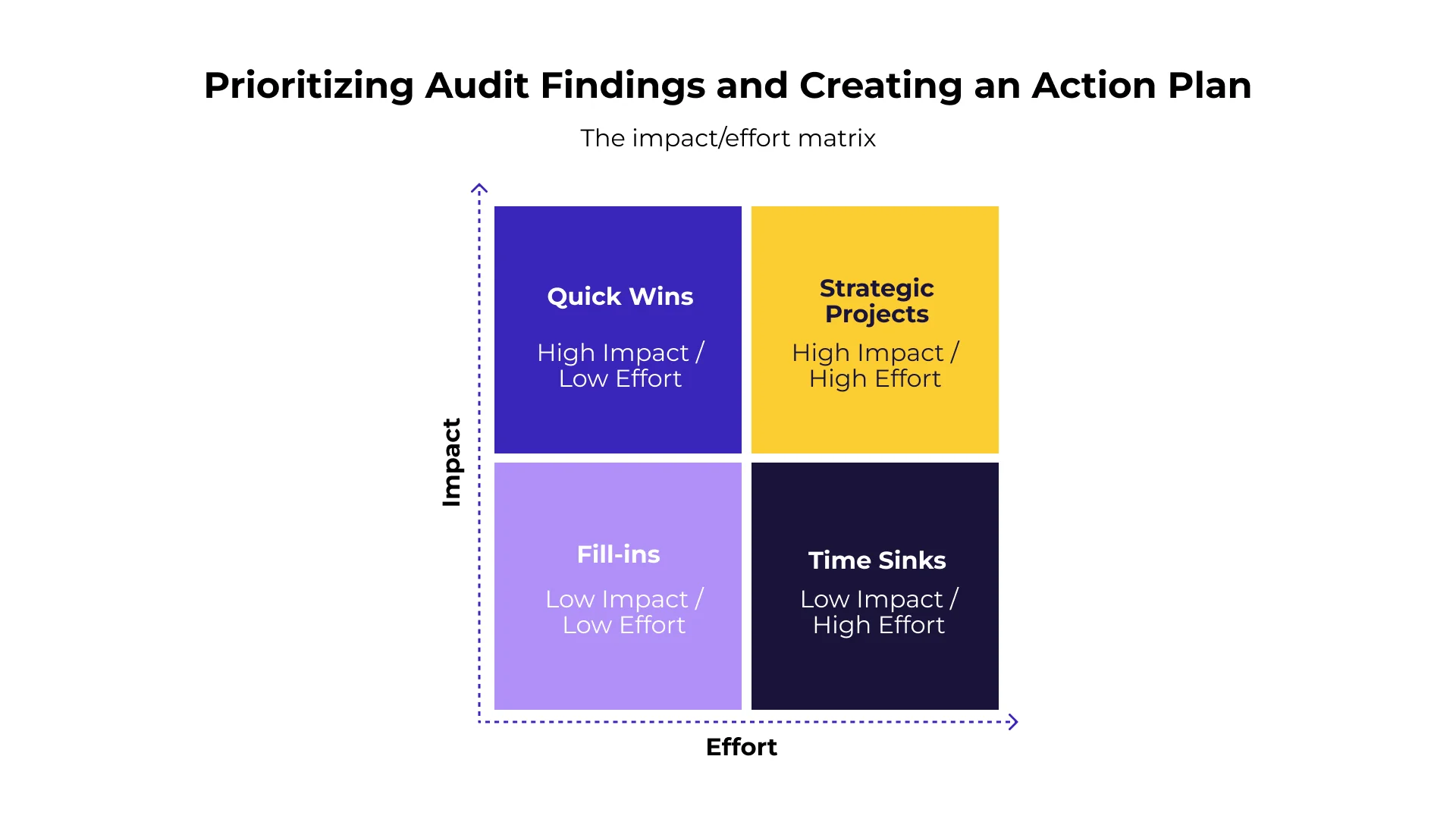
A good audit can uncover dozens of issues. The job is to decide which problems are most likely to improve buyer confidence, lead quality, pipeline value, or revenue.
Use SiteTuners’ Impact vs. Effort approach to sort each finding after discovery and diagnosis, not before. In B2B ecommerce, “impact” can mean better RFQ quality, higher pipeline value, smoother reordering, fewer stalled approvals, or fewer high-value accounts leaving because the site hides important information.
- High Impact / Low Effort (Quick Wins): Fix broken form validation, unclear button copy, missing trust signals, or analytics tracking gaps on money pages.
- High Impact / High Effort (Strategic Projects): Redesign wholesale checkout, connect real-time ERP pricing, improve quote-builder workflows, or rebuild catalog navigation.
- Low Impact / Low Effort (Fill-ins): Clean up minor copy issues, small design bugs, or secondary page details.
- Low Impact / High Effort (Time Sinks): Be careful with custom features that take heavy development time but do not remove a proven conversion barrier.
Start with shared templates and core revenue pages because changes there can affect many buyer journeys at once. The SiteTuners guide on how to increase conversion rate includes more ways to prioritize fixes without turning the audit into a wishlist.
Mapping Customer Journeys to Eliminate Hidden Friction
Map your findings to the people involved in the B2B buying process. Different roles may enter through different pages and may never see the same information, so do not audit only the homepage-to-checkout path.
- End Users: Need product dimensions, installation details, usability information, and technical specs. Audit check: from a product or category page, can an end user confirm fit without downloading a confusing PDF or contacting sales?
- Technical Evaluators: Look for certifications, integration details, security standards, compatibility information, and documentation. Audit check: can a technical evaluator find compliance documentation from the product page or resource path without a sales handoff?
- Procurement Buyers: Need pricing clarity, purchase-order support, payment terms, vendor requirements, and reorder options. Audit check: can procurement understand how pricing, terms, account setup, and purchase orders work before they fill out a long form?
- Economic Buyers: Care about total cost, ROI, warranty terms, supplier reliability, and risk reduction. Audit check: can an executive or budget owner find proof that the vendor is credible and the purchase risk is low?
Your site should answer each role’s main questions at the right stage of the journey. For more on matching pages to buyer intent, see The Definitive Guide to Website Optimization.
Key Triggers for Conducting an Immediate B2B Conversion Audit
There is no universal schedule that works for every B2B ecommerce site. What matters is regular performance monitoring and deeper audits when something important changes.
Run a conversion audit when you see signs such as:
- Major Site Migration or Redesign: Audit before and after launch so structural changes do not damage important buying paths. After a platform migration, tracking, forms, and quote paths can break quietly.
- Unexpected Drop in Conversion Metrics: A sudden fall in lead submissions, quote requests, online sales, or reorder activity may point to tracking, technical, or UX problems.
- Product Catalog or Business Model Expansion: Moving into tiered wholesale, new product lines, self-service ecommerce, or account-based pricing changes what buyers need from the site.
- Stagnant Pipeline Despite Traffic Growth: If traffic is up but qualified quote requests are flat, your pages may be attracting attention without creating action.
- New Sales or Fulfillment Requirements: Changes to shipping, payment terms, account approvals, or ERP integration can create friction if the site experience is not updated.
Frequently Asked Questions
What are the most common conversion problems on B2B ecommerce sites?
Common B2B conversion blockers include hidden product details, gated pricing, long request-for-quote forms, weak mobile usability, unclear calls to action, missing technical documentation, quote-builder friction, and checkout flows that do not support real business buying teams.
How often should a B2B company conduct a conversion audit?
There is no universal audit schedule for every B2B ecommerce site. Monitor conversion performance regularly, then run deeper audits after major redesigns, platform changes, traffic or lead-quality shifts, product-catalog changes, pricing-model changes, or sudden drops in quote requests, sales, or reorder activity. A platform migration is a good example: tracking, forms, and quote paths can break quietly unless someone checks them after launch.
What is the difference between a B2B and a B2C conversion audit?
A B2C audit usually focuses on individual shoppers, simple checkout, and fast purchases. A B2B audit looks at longer buying cycles, buying committees, custom or volume pricing, purchase orders, account permissions, lead quality, quote workflows, reordering, and pipeline value.
Conclusion
A useful B2B ecommerce audit should leave your team with more than a list of problems. It should show which buyer paths are leaking value, which issues are hurting RFQ quality or pipeline, and which fixes deserve testing first.
When you discover the current state, diagnose friction, and decide what to prioritize, your site becomes easier for real B2B buyers to use. That can mean clearer quote requests, stronger leads, smoother reordering, and fewer missed opportunities from the traffic you already have.
If your audit surfaces more than a handful of high-impact issues, or if your team does not have the bandwidth or testing infrastructure to address them, outside CRO support can help.
Ready to uncover what is preventing more B2B buyers from converting? Speak with a SiteTuners CRO expert to identify the highest-impact opportunities on your website.