
Why Website Speed Directly Controls Your Bottom Line
_compressed.png?alt=media&token=7582dbdb-48d6-49de-b800-56992ec23247 "website-performance-score-slow-site-speed.png")
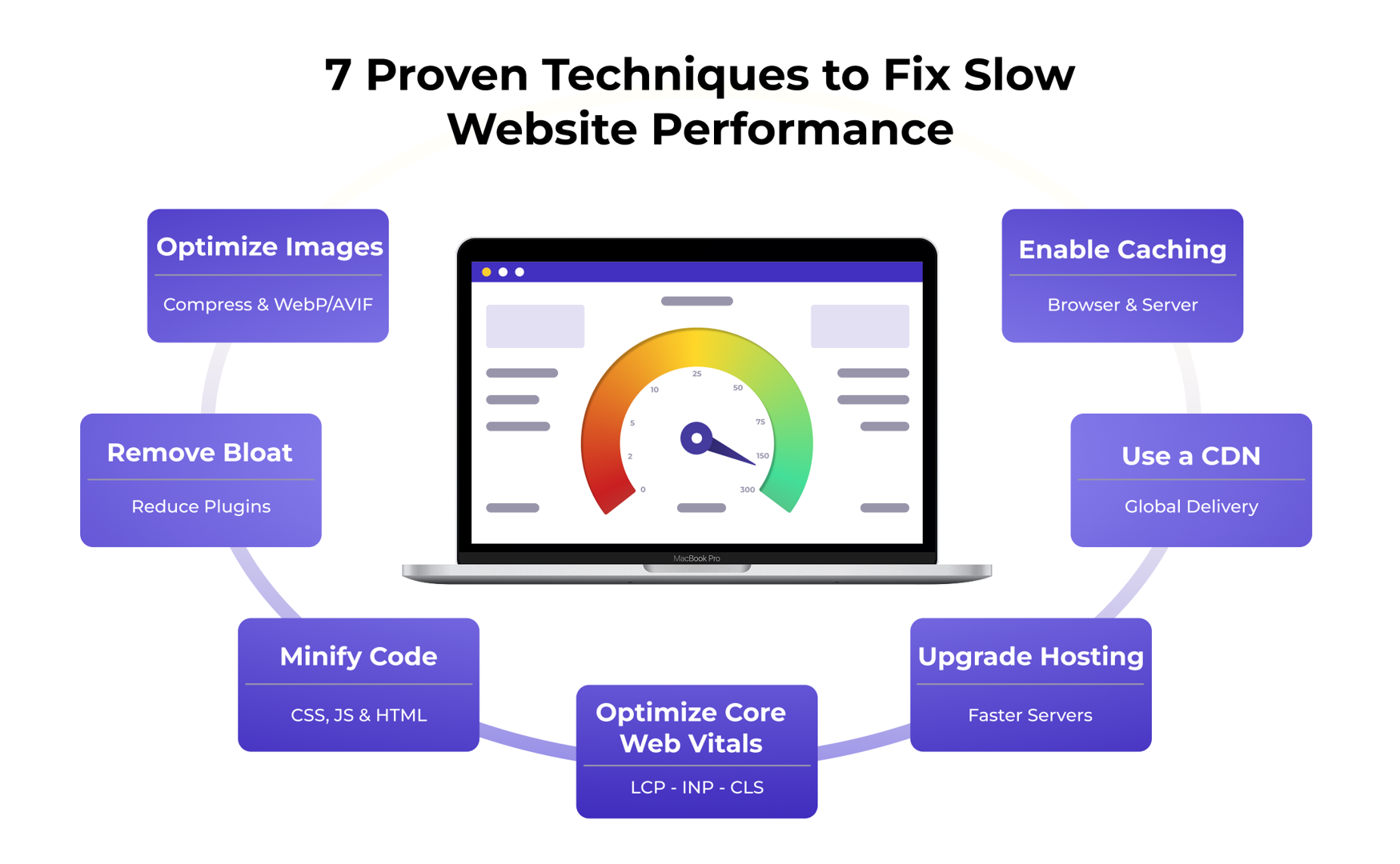
Fix slow website performance issues immediately with these proven techniques:
- Optimize images – Compress and resize images, use modern formats (WebP, AVIF), implement lazy loading
- Enable caching – Set up browser and server-side caching to store static resources
- Minify code – Compress CSS, JavaScript, and HTML files to reduce file sizes
- Use a CDN – Distribute content globally through a Content Delivery Network
- Upgrade hosting – Move from shared hosting to faster alternatives if needed
- Remove bloat – Eliminate unnecessary plugins, scripts, and third-party resources
- Optimize Core Web Vitals – Focus on LCP, INP, and CLS metrics
Nobody deliberately builds a slow website. Yet countless businesses watch potential customers vanish because their pages take too long to load.
The numbers tell a stark story: A 100ms delay in page load can decrease conversions by 7%. Scaled to a full second (1,000ms), the revenue impact becomes massive. For a business generating $200 million annually, that single second of delay could cost over $22 million. Meanwhile, 40% of users abandon a site that takes longer than 3 seconds to load.
Website speed isn’t just a technical metric—it’s a direct conversion factor. When pages load slowly, visitors leave for your competitors and never return. Google knows this too, which is why page speed directly influences your search rankings through Core Web Vitals.
The frustration is real. You invest in marketing, drive traffic, and optimize messaging—only to see bounce rates climb. The culprit? A slow website undermining every dollar you spend. The good news is that performance issues have clear causes and proven solutions.
I’m Jeff Loquist, Senior Director of Optimization at SiteTuners. With 18 years of experience, I’ve seen how fixing slow website issues translates directly to revenue growth.
This guide provides a clear action plan to diagnose what’s slowing your site, implement high-impact fixes, and maintain fast performance to eliminate speed-related conversion losses.
Quick fix slow website terms:
Why a Slow Website is a Silent Conversion Killer
Imagine clicking a link, only to be met with a painfully slow loading spinner. Today’s users expect instant gratification; if your site doesn’t deliver, they leave. This contributes to a high bounce rate, signaling that something is wrong.
Studies consistently show the devastating impact of slow load times:
- A 1-second delay in page load can reduce conversions by 7%.
- 47% of users expect a site to load within two seconds.
- 40% of users will bounce if a site takes longer than 3 seconds to load, especially impatient mobile users.
This isn’t just about frustrated users; it’s about lost revenue. Furthermore, website speed is a critical SEO ranking factor. Google’s Page Experience update cemented the importance of a fast user experience. A slow site might leave you buried in search results, especially on mobile, where speed is paramount. We’ve seen how mobile usability issues can cripple conversion rates.
A slow website also erodes brand perception, suggesting a lack of professionalism and undermining trust.
Understanding Google’s Core Web Vitals
To measure user experience, Google introduced Core Web Vitals. Optimizing for these metrics is crucial to fix slow website issues and improve search rankings.
Largest Contentful Paint (LCP): Measures the loading time of the largest content element (e.g., an image or text block). It reflects perceived loading speed.
- What’s a good score? We aim for an LCP of 2.5 seconds or less.
First Input Delay (FID) / Interaction to Next Paint (INP): Measures page responsiveness. It’s the time from a user’s first interaction (like a click) to the browser’s response. Google has officially replaced First Input Delay (FID) with Interaction to Next Paint (INP) as a Core Web Vital, which assesses overall interaction latency.
- What’s a good score? For FID, we want 100 milliseconds or less. For INP, we aim for 200 milliseconds or less. Improving INP is strongly correlated with better engagement and conversion performance.
>
- What’s a good score? For FID, we want 100 milliseconds or less. For INP, we aim for 200 milliseconds or less. Improving INP is strongly correlated with better engagement and conversion performance.
Cumulative Layout Shift (CLS): Measures visual stability by quantifying unexpected layout shifts during page load.
- What’s a good score? We strive for a CLS of 0.1 or less.
Pages that meet these thresholds provide a good user experience, which Google rewards with better search rankings.
How to Diagnose and Fix Your Slow Website with Performance Tools
Before we can fix slow website issues, we must measure performance to establish a baseline and track improvements.
When analyzing performance, we use two data types:
- Lab Data: Collected in a controlled environment (e.g., via Lighthouse). It’s great for debugging specific bottlenecks.
- Real User Monitoring (RUM): Data from actual users (e.g., via Google’s CrUX report). It reflects real-world experience and confirms if fixes are working.
Both are important. As conversion expert Anil Batra advises, “Look at the areas where you can have the biggest impact… Find the worst performing page, and do a radical change, that’s going to show a big impact.”
Essential Free Tools for Performance Analysis
A suite of powerful, free tools can diagnose website speed:
_compressed.png?alt=media&token=579973fb-33b2-46f1-b950-01fbbe16a9c5 "Google pagespeed insights")
Google PageSpeed Insights: Provides a performance score for mobile and desktop, measures Core Web Vitals, and offers actionable recommendations. You can test your website using Google’s PageSpeed Insights.
Google Lighthouse: An audit tool in Chrome DevTools that analyzes performance, accessibility, and SEO, providing detailed suggestions. Google Lighthouse is essential for developers.
Pingdom: Analyzes load speed from global locations and provides a waterfall chart to visualize requests and identify bottlenecks. Pingdom is invaluable for this.
GTmetrix: Offers detailed performance insights, a waterfall chart, and optimization recommendations. GTmetrix is another solid choice for analysis.
Interpreting Waterfall Charts: These charts visualize the loading process for each resource (images, scripts, etc.), breaking it down into stages like DNS lookup, connection, and wait time (TTFB). By examining the chart, we can spot long bars that represent bottlenecks holding up the page load. This data, combined with insights from our analytics tools, allows us to pinpoint exactly where our conversion killers are lurking.
The Ultimate Toolkit to Fix Your Slow Website
Now that we know how to diagnose the problem, let’s dive into the most effective strategies to fix slow website issues and get our conversions soaring.
1. Optimize Your Images for a Massive Speed Boost
Images are often the largest contributors to page weight, frequently accounting for over half of total page size, which is more than half of the ideal 1,600 KB total page size. But don’t despair! We can drastically reduce their impact without sacrificing visual quality.
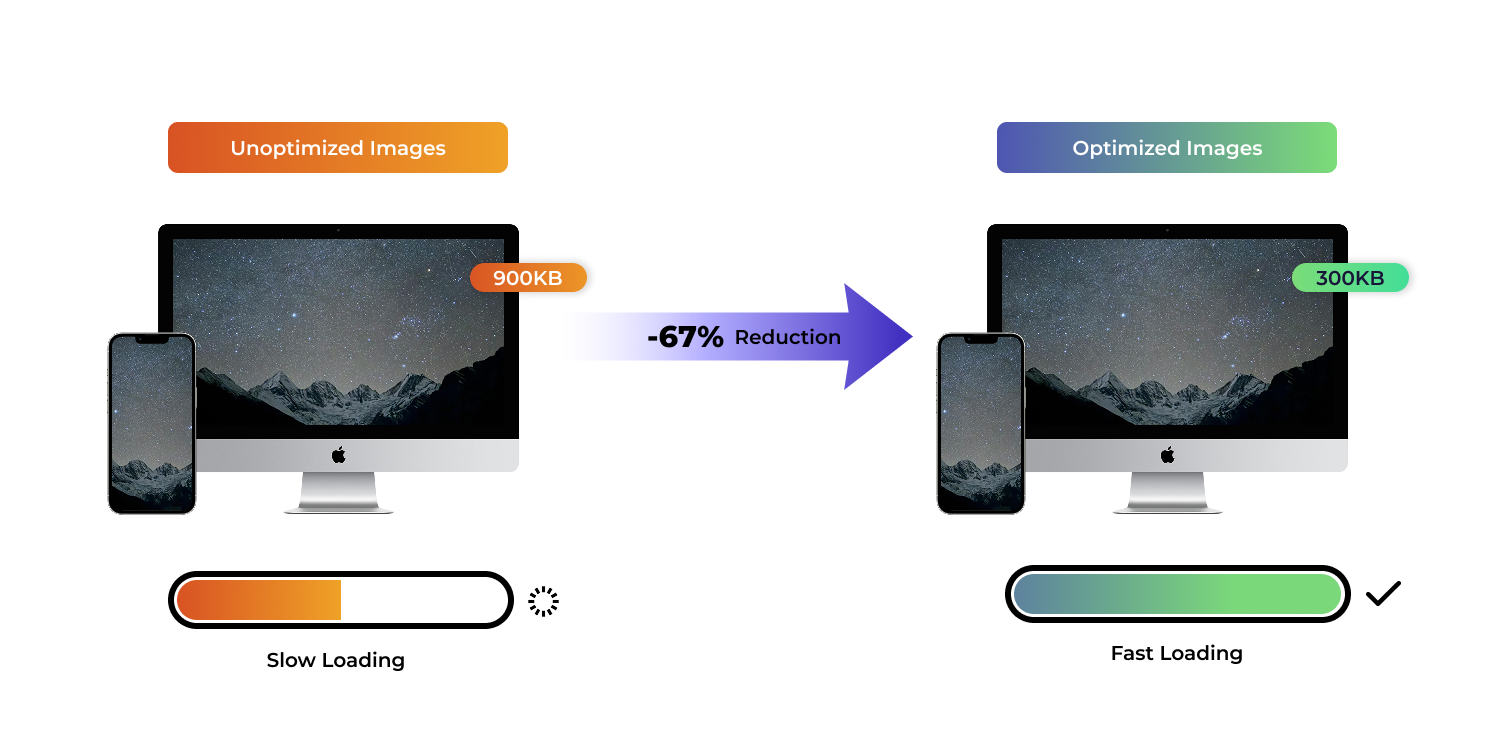
- Image Compression: This is the easiest win. We can reduce file sizes significantly by compressing images. Tools like Squoosh or ImageOptim can achieve 40% savings (e.g., from 18.6 KB to 11.2 KB) with minimal quality loss. For WordPress users, plugins like Smush can compress existing images.
- Choosing the Right Format: Not all image formats are created equal.
- JPEG: Best for photographs with many colors.
- PNG: Ideal for graphics, logos, or images with transparency.
- WebP & AVIF: These are modern, next-gen formats that offer superior compression and quality compared to JPEGs and PNGs. We should use them wherever possible.
- Avoid outdated formats like BMP and TIFF.
- Lazy Loading Implementation: Why load an image if the user can’t even see it yet? Lazy loading defers the loading of images (and videos) until they are about to enter the user’s viewport. This means the browser only fetches what’s immediately needed, speeding up initial page load. Learn more about lazy loading images.
- Responsive Images with
srcset: Instead of serving one large image to all devices, we can use thesrcsetattribute in our HTML. This allows the browser to choose the most appropriate image size based on the user’s device, screen resolution, and viewport size. - Using Image CDNs: Image Content Delivery Networks (CDNs) can automatically optimize, resize, and convert images to the best format for each user on the fly.
- Avoiding Blank
srcAttributes: Make sure no images have blanksrcattributes, as this can cause unnecessary traffic and errors.
Websites with images have 94% more views, so we don’t want to remove them – we just want to optimize them effectively.
2. Leverage Caching to Serve Pages Instantly
Caching is like having a super-efficient assistant who remembers everything. Instead of fetching data from scratch every time, caching stores frequently accessed data closer to the user, leading to significantly faster load times.
- Browser Caching: When a user visits our site, their browser can store static files (like images, CSS, and JavaScript) locally. The next time they visit, the browser doesn’t need to re-download these files from the server. This can reduce load time by nearly two whole seconds for repeat visitors.
- Server-Side Caching: This happens on our web server and can take several forms:
- Page Caching (Dynamic Caching): This stores the entire HTML output of a page. When a user requests that page, the server can serve the cached HTML directly, bypassing PHP and MySQL processing. This is especially effective for static content.
- Object Caching (Memcached): This caches database query results or other computed data, making our database more efficient and speeding up dynamic content generation.
- How Caching Reduces Server Load: By serving cached content, we drastically reduce the work our origin server has to do. This means faster response times for users and better performance, especially during traffic spikes.
- Time to First Byte (TTFB): Caching directly impacts TTFB, which is the time it takes for the browser to receive the first byte of response from the server. A lower TTFB means the server is processing requests faster. We’ve seen TTFB improve from 3.68 seconds to 415 milliseconds with effective caching.
- Popular Caching Plugins for WordPress: If our site runs on WordPress (a popular choice in the US, Canada, and Europe), several plugins can help us implement robust caching:
- W3 Total Cache: A comprehensive performance plugin that offers various caching types (page, object, browser, CDN integration).
- WP Rocket: A user-friendly premium plugin known for its ease of use and powerful caching features.
- SiteGround Speed Optimizer: For SiteGround users, this plugin provides dynamic caching, Memcached, and browser caching options.
3. Minify and Optimize Your Website’s Code
Our website’s code (HTML, CSS, JavaScript) can often be bloated with unnecessary characters like whitespace, comments, and new lines. While these are helpful for developers, they add to file size and download time.
- Minification Explained: This process involves removing all superfluous characters from our code files without changing their functionality. The result is smaller files that transfer faster over the network.
- Combining CSS and JavaScript Files: Each file typically requires a separate HTTP request. By combining multiple CSS files into one, and similarly for JavaScript, we reduce the number of requests our browser needs to make, speeding up page rendering. We can even use techniques like sprite sheets to combine multiple small images into one, reducing HTTP requests for them as well.
- Removing Render-Blocking Resources: Some CSS and JavaScript files are “render-blocking,” meaning the browser has to fully process them before it can display any content. This directly impacts our LCP and overall perceived speed. We need to identify these and either remove them, defer them, or make them asynchronous.
- Using
asyncordeferfor Scripts:- The
asyncattribute tells the browser to download the script asynchronously (in parallel with HTML parsing) and execute it as soon as it’s downloaded, without blocking rendering. - The
deferattribute also downloads the script asynchronously but executes it only after the HTML document has been fully parsed. This is ideal for scripts that don’t need to run immediately to render the page.
- The
- Code Compression with Gzip: Before our minified files are sent to the browser, they can be further compressed using algorithms like Gzip. This instructs the server to group web objects together, making the data transferred significantly smaller. We’ve seen content compressed by 59.9% using gzip.
- Practical Tips to Reduce Visitor Load: Beyond minification, we should also examine our HTML. Avoid excessive inline styling, empty new lines, and unnecessary comments. Tools like HtmlCompressor for HTML and YUI Compressor for JavaScript and CSS can automate these tasks. For more general advice, explore practical tips to reduce visitor load.
4. Boost Delivery with a CDN and Better Hosting
Even with perfectly optimized code and images, a slow server or long distances can cripple our website’s performance. This is where Content Delivery Networks (CDNs) and quality hosting come into play.
- What is a Content Delivery Network (CDN): A CDN is a geographically distributed network of proxy servers and their data centers. When a user requests content from our website, the CDN delivers it from the server location closest to them, rather than from our origin server. CDNs have a worldwide network of servers that store static files from our website, including JavaScript, CSS, logos, and other unchanging files.
- How CDNs Reduce Latency: By serving content from a nearby server, a CDN drastically reduces the physical distance data has to travel. This minimizes network latency, resulting in faster load times. It also offloads traffic from our origin server, improving its response time.
- Choosing a Quality Web Host: Our web host is the foundation of our website’s performance. A cheap, unreliable host will always be a bottleneck, no matter how much we optimize our code. We should aim for a hosting provider with an average server response time under 200 ms.
- Shared vs. VPS vs. Dedicated Hosting:
- Shared Hosting: Multiple websites share resources on a single server. It’s affordable but can lead to slow performance during traffic spikes if other sites consume too many resources.
- Virtual Private Server (VPS): Offers more dedicated resources than shared hosting, providing better performance and stability.
- Dedicated Hosting: We get an entire server to ourselves, offering maximum performance, control, and security.
If our website experiences significant traffic or requires robust performance, upgrading from shared hosting to a VPS or dedicated server can be a game-changer.
- The Impact of Server Response Time: This is the time it takes for our web server to respond to a request. A slow server response time directly contributes to a high TTFB, delaying the entire loading process. A good CDN and quality hosting are essential for keeping this metric low.
5. Tame Third-Party Scripts and Plugins
Third-party scripts and plugins are double-edged swords. They add functionality and convenience but can introduce significant performance overhead if not managed carefully.
- The Performance Cost of Plugins: Every plugin or third-party script we add to our site introduces additional code, HTTP requests, and sometimes even external dependencies. Poorly coded plugins can consume excessive server resources or load unnecessary JavaScript and CSS, significantly slowing down our site. We’ve seen that 75.49% of the top one million sites still use jQuery, which is just one example of a common external dependency.
- Common Culprits:
- Analytics Scripts: While essential (e.g., Google Analytics), they add overhead.
- Ad Network Tags: Often load many resources and can be heavy.
- Social Media Widgets: Like share buttons or embedded feeds, these can pull in substantial external code.
- Chatbots, Marketing Automation Tools, A/B Testing Scripts: All add to the page weight and execution time.
- How to Audit and Remove Unnecessary Scripts:
- DevTools Coverage Panel: This powerful tool in Chrome DevTools shows us how much of our CSS and JavaScript code is actually being used when the page loads. It’s a great way to identify unused code from plugins or third-party scripts that can be safely removed or optimized.
- DevTools Request Blocking Tab: This allows us to temporarily block specific scripts or resources to see their impact on page load. It’s a quick way to test if a particular script is causing a major slowdown.
- Using Google Tag Manager Wisely: Google Tag Manager (GTM) is an excellent tool for managing third-party scripts. Instead of embedding each script directly into our HTML, we can add them via GTM. This gives us more control, allows for conditional loading, and can help consolidate requests, reducing overall impact.
The key is to regularly audit our plugins and third-party scripts. If we don’t absolutely need a plugin’s functionality, or if a script is causing a significant performance hit, it might be time to remove or replace it.
Creating a Long-Term Performance Strategy
Optimizing website speed isn’t a one-time fix; it’s an ongoing process. New content, plugins, or features can introduce regressions, so performance requires continuous care.
- Create a Performance Budget: Set measurable thresholds for key metrics like page weight (e.g., under 1,600 KB), image sizes, and Core Web Vitals scores. If a new feature pushes you over budget, it needs optimization.
- Monitor Continuously: Use tools like PageSpeed Insights for regular checks. Consider Real User Monitoring (RUM) to track actual user experiences and catch regressions early.
- Develop an Action Plan: A clear plan helps you tackle improvements systematically. Our guide on developing an action plan can help structure your efforts.
- Prioritizing High-Impact Pages: Concentrate efforts on pages crucial to your business goals, like the homepage, product pages, and the checkout process.
How to prioritize improvements to fix a slow website
With a list of potential fixes, prioritization is key to getting the most impact:
- Focus on High-Impact Fixes: Use the 80/20 rule to identify the 20% of issues causing 80% of the slowdown. Prioritize “low-hanging fruit” like image optimization and eliminating render-blocking resources for quick, significant gains.
- Address Low-Hanging Fruit: These are the easy, quick fixes that yield immediate results. Image compression, enabling basic caching, or removing unused plugins are often good starting points.
- Tackle Render-Blocking Resources: These directly impact how quickly our users see and interact with our content, making them a high-priority fix.
- Determine What to Test: Once we’ve identified potential improvements, we need to test them. Our guide on determining what to test can provide a framework for effective testing.
By adopting a systematic approach and continuously monitoring your site, you ensure that it remains fast, user-friendly, and a powerful engine for conversions.
Conclusion
We’ve covered a lot of ground today on how to fix slow website issues. We’ve seen how crucial website speed is for user experience, search engine rankings, and ultimately, our conversion rates. From the frustration of a 100ms delay costing us 7% in conversions to Google’s watchful eye on Core Web Vitals, the message is clear: speed is non-negotiable.
Our toolkit for optimization includes diagnosing issues with powerful free tools like Google PageSpeed Insights and Lighthouse, then implementing targeted strategies:
- Optimizing images with compression, modern formats, lazy loading, and responsive techniques.
- Leveraging caching both in the browser and on the server to reduce load times and improve TTFB.
- Minifying and compressing our code to shed unnecessary weight and eliminate render-blocking resources.
- Boosting delivery with CDNs and choosing robust hosting solutions.
- Taming third-party scripts and plugins to prevent performance bloat.
Website speed optimization is an ongoing journey, not a destination. It requires continuous monitoring, a clear action plan, and a commitment to prioritizing improvements that deliver the biggest impact for our users and our business.
Don’t let a slow site undermine your marketing efforts and kill your conversions. A fast website isn’t just a technical achievement; it’s a fundamental pillar of a successful online presence.
Are you ready to stop losing potential customers to slow loading times? Take the first step to a faster, higher-converting website with our expert CRO services.