Recently we spent time analyzing the well-known e-commerce website, Stanton Optical and spotted lots of conversion killers.
These are an enterprise size company. Nationwide. Probably have thousands of visitors but are leaving a lot of revenue behind.
Generally, e-commerce companies spend money driving traffic through ads, SEO, and social media. But often, when visitors land on your product page, they bounce.
Why? Because your product page fails to do its one job: convert browsers into buyers.
Over the past two decades, we’ve optimized over 2,100 websites and run thousands of conversion tests.
In this blog, we’re going to show you exactly where e-commerce product pages go wrong and how to fix them.
These are proven tactics that have generated millions in additional revenue for our clients.
And we will also provide the three sample wireframe PDFs to download below. Watch the video below by clicking on the image for Jeff’s live video analysis of their site.
What Questions Do Visitors Ask When They Land on Your Product Page?
Every visitor who lands on your product page asks themselves three critical questions within seconds:
- “Am I in the right place?”
- “How do I feel about this?”
- “What am I supposed to do next?”
If your product page doesn’t immediately answer these questions, you’ve lost the sale.
Let me show you what this looks like in practice.
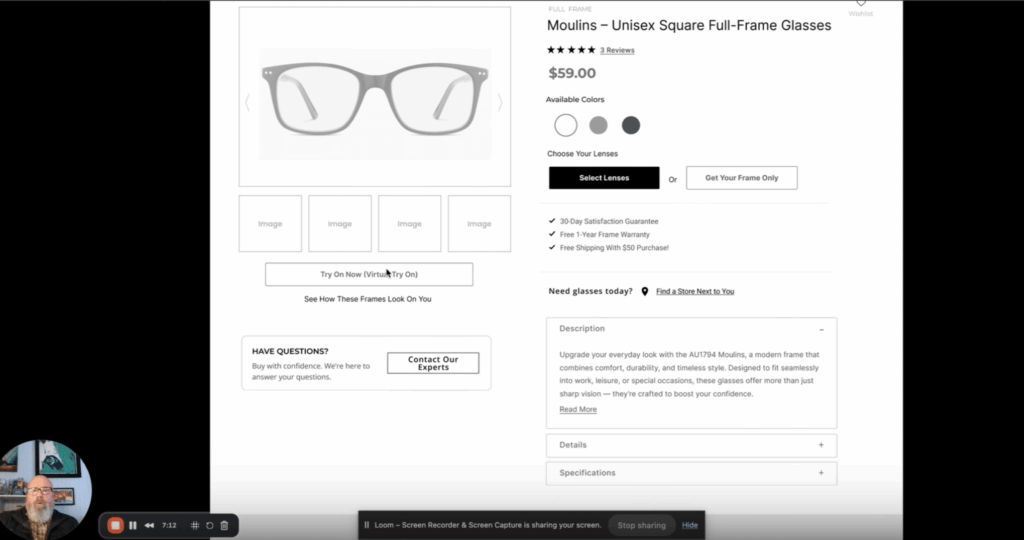
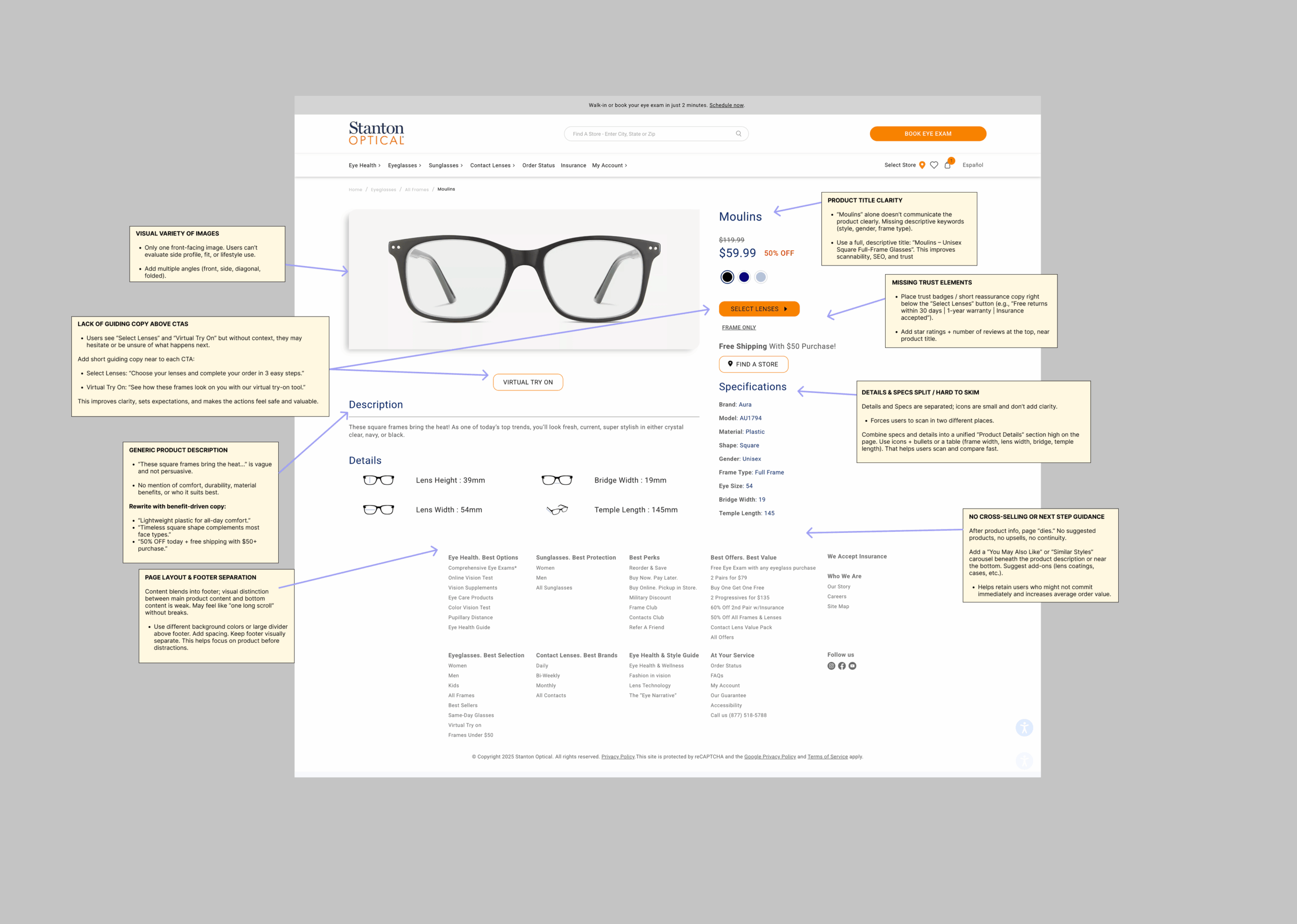
When we reviewed Staunton Optical’s product page, the first thing we saw was “Moulins.” Just the brand name. No context. No clarity.
Are these glasses for men? Women? Unisex? What style are they? What makes them special?
A potential customer coming from a product ad or Google search has zero context. They need immediate confirmation that they’ve found what they’re looking for.
The fix: Add descriptive text that tells visitors exactly what they’re looking at. Instead of just “Moulins,” use “Moulins Unisex Square Full Frame Glasses.”
This serves two purposes:
- It gives customers instant clarity about the product
- It adds SEO value for product listings
When visitors can immediately confirm they’re in the right place, bounce rates drop and conversion rates climb.
Why Are Multiple Product Images Non-Negotiable?
Single product images kill conversions. Period.
When we reviewed the Staunton Optical product page, it had one image. Just one angle of the frames.
This is such a common issue we see.
Think about how you shop online. You zoom in. You look at products from different angles. You want to see details. This is especially true for products like glasses where fit, style, and finish matter.
According to our testing across hundreds of e-commerce sites, adding multiple product images typically increases conversion rates by 5-10%. The exact lift depends on the product category and price point, but the pattern is consistent.
Why does this work?
Multiple images make visitors feel better about their purchase decision. The site feels more robust, more trustworthy. It signals that you have nothing to hide and want customers to make informed decisions.
Here’s what you need:
- Front view
- Side angles (both sides)
- Close-ups of key details
- Lifestyle images showing the product in use
- Size/scale reference when relevant
Make these images easy to navigate. Users should be able to click through them or use arrows on both desktop and mobile. The less friction, the better.
For more-ecommerce content, here’s our Ultimate Guide.
How Do You Make Features Like Virtual Try-On Actually Drive Conversions?
Staunton Optical had a virtual try-on feature. This is a great tool that can genuinely improve conversion rates.
But you’d never know it from looking at their page.
The virtual try-on button just sat there. No context. No excitement. Nothing to make visitors want to use it.
This is a massive missed opportunity.
The problem: Features without context don’t convert. Visitors need to understand not just what a feature is, but why they should care.
The solution: Frame your features around benefits and excitement. Instead of a plain “Virtual Try On” button, try:
“Try On Now – See How These Frames Look On You”
This adds context and creates anticipation. It tells visitors exactly what will happen and why it’s valuable to them.
When we redesigned the wireframe for this client, we elevated the virtual try-on feature by:
- Adding descriptive text explaining the benefit
- Making it visually prominent
- Positioning it near the primary CTA to maximize usage
Features are table stakes. How you present them makes the difference between 2% conversion rates and 8% conversion rates.
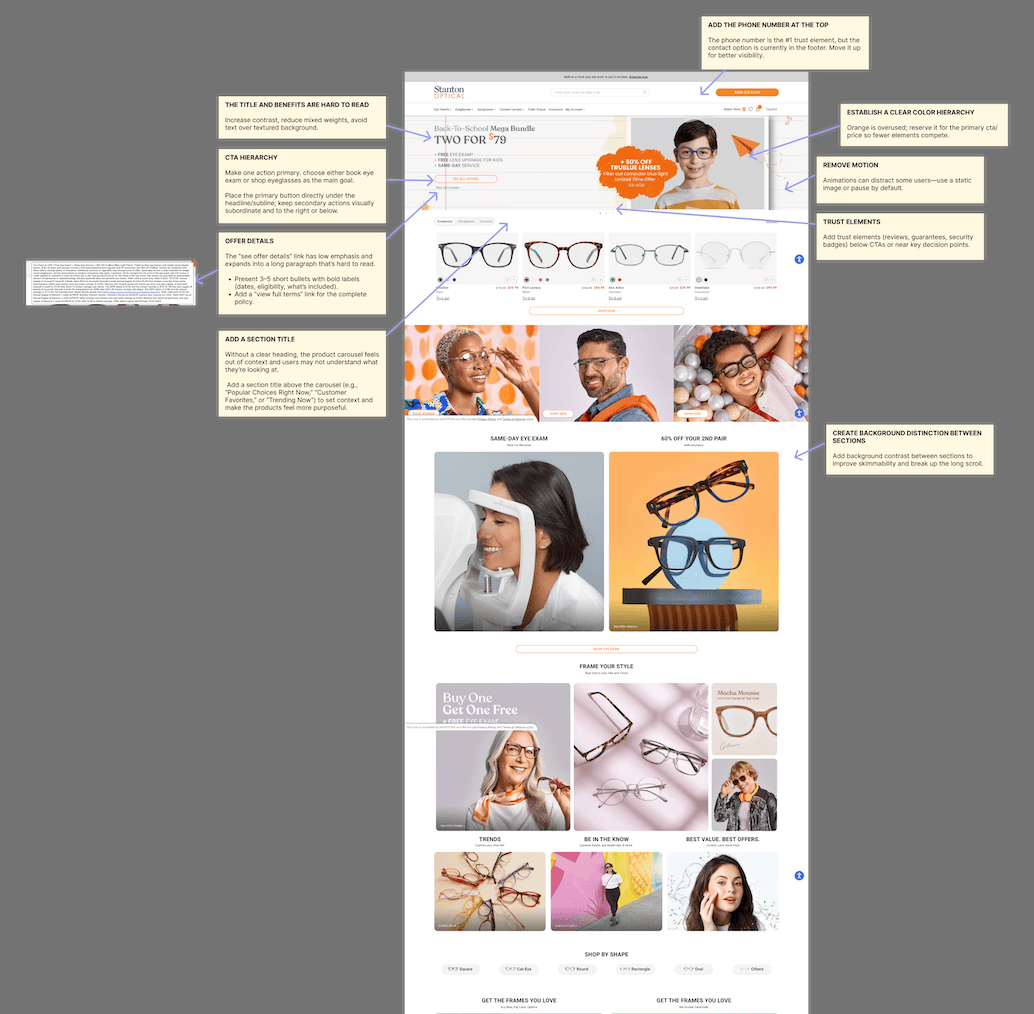
Below, is a homepage analysis we created with data-backed CRO. These strategies are similar to what we used to help e-commerce company, Beautronics increase their conversions by 50X.
What Makes Product Descriptions Actually Convert?
Technical specifications don’t sell products. Benefits do.
Look at most product descriptions and you’ll see something like this:
- Lens height: 39mm
- Temple length: 140mm
- Bridge width: 18mm
These specs matter to some customers, but they don’t make anyone excited about buying.
Here’s what actually sells:
- “Lightweight plastic for all-day comfort”
- “Timeless square shape complements most face types”
- “Durable construction backed by our 1-year warranty”
Notice the difference? The second set of descriptions focuses on what the customer experiences, not what the product technically is.
We recommend a two-tier approach:
Tier 1 – Benefits (prominently displayed) Focus on comfort, style, durability, and other experiential benefits that answer “What’s in it for me?”
Tier 2 – Specifications (available but secondary) Include the technical details in an expandable section for customers who want to dive deep
This structure works on mobile too, which is critical since 60-70% of e-commerce traffic now comes from mobile devices.
Break up your descriptions with:
- Short paragraphs (1-3 sentences maximum)
- Clear headers that organize information
- Expandable sections to reduce clutter
- Bullet points for scannability
Remember: People don’t buy specifications. They buy outcomes.
Where Should Trust Elements Live on Product Pages?
Phone numbers are the single most powerful trust element on the planet.
We’ve tested this across hundreds of websites in dozens of countries. The phone number in the top right corner consistently wins as the strongest trust signal you can add to your site.
Why? Because it signals:
- You’re a real company
- You’re accessible
- You stand behind your product
- Customers can get help if needed
But here’s what most sites get wrong: They bury trust elements or scatter them randomly across the page.
On the Staunton Optical product page, there were no visible trust elements above the fold. No phone number. No guarantees. No reassurance.
When we add trust elements strategically throughout the product page and checkout process, we typically see 20-25% increases in people clicking the primary CTA and moving through the purchase process.
Here’s where trust elements should live:
| Location | Trust Element | Impact |
| Top right header | Phone number (click-to-call on mobile) | High – establishes credibility immediately |
| Below product price | Free returns, warranty, insurance accepted | High – reduces purchase anxiety |
| Near Add to Cart | Customer reviews/ratings | High – social proof at decision point |
| Checkout process | Security badges, money-back guarantee | Medium-High – final reassurance |
| Footer | Detailed policies, contact info | Medium – provides depth for researchers |
Key trust elements to include:
- Phone number (make it prominent in top right-hand corner)
- Free returns with timeframe (30 days, 60 days, etc.)
- Warranty information (1 year, lifetime, etc.)
- Payment security badges
- Customer reviews and ratings
- Insurance or payment plans accepted
- “Contact us” with multiple channels
Don’t make customers hunt for this information. Put it right where they’re making decisions.
Why Does Cross-Selling Matter on Product Pages?
If a visitor gets to the bottom of your product page and it’s not the right fit, where do they go?
On most sites, they leave. They hit the back button or close the tab. That’s a lost opportunity.
Staunton Optical’s product page dropped visitors straight into the footer. No alternative products. No “You might also like” section. No way to keep them engaged.
This is leaving money on the table.
The solution: Add a “You May Also Like” or “Popular Frames” section at the bottom of every product page.
This serves several purposes:
- Recovers bounces: Gives visitors alternatives if the current product isn’t right
- Increases average order value: Introduces complementary products
- Improves session duration: Keeps visitors engaged with your site
- Provides SEO value: Creates internal linking opportunities
What to include in your cross-sell section:
- 4-6 related products
- Clear product images
- Pricing information
- Brief benefit-focused description
- Easy “Quick View” or “Add to Cart” options
When done right, cross-selling can recover 15-20% of visitors who would otherwise bounce. That’s a significant lift from a simple page element.
What Does a High-Converting Product Page Actually Look Like?
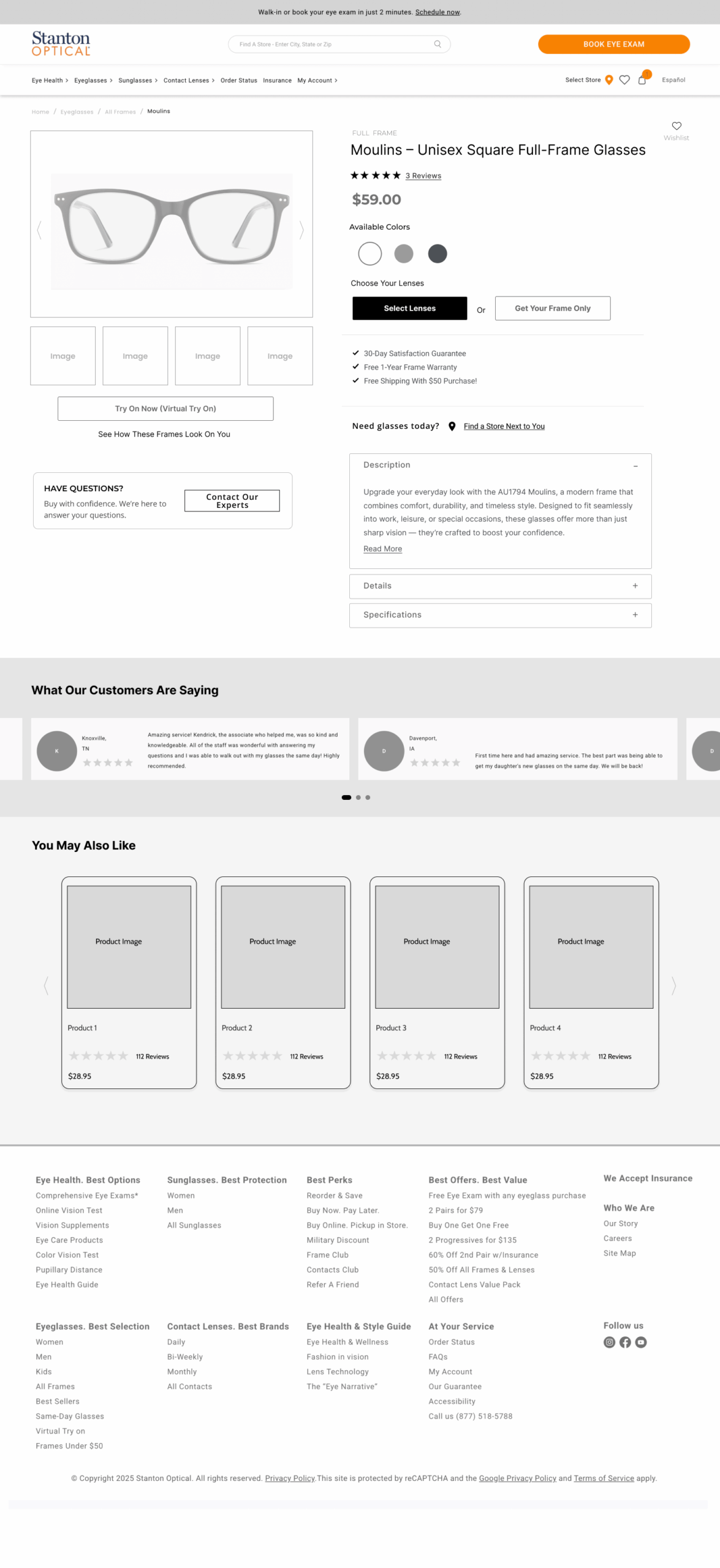
After identifying all the issues on Staunton Optical’s product page, we created a wireframe showing what a conversion-focused page should look like.
Here’s what changed:
1. Descriptive Product Title “Moulins Full Frame Unisex Square Glasses” – immediately tells visitors exactly what they’re looking at and adds SEO value.
2. Multiple Product Images 6-8 images showing different angles, with easy navigation via thumbnails and left/right arrows. Works seamlessly on mobile.
3. Available Colors Clearly labeled “Available Colors” section with clickable swatches, removing ambiguity.
4. Clear CTA Options “Select Lenses” and “Get Frame Only” options prominently displayed, with guidance on which option makes sense.
5. Strategic Trust Elements
- Phone number in top right
- Free shipping and 30-day returns clearly visible
- One-year warranty highlighted
- Multiple insurance options noted
- Customer reviews at the top (clicking jumps to review section)
6. Enhanced Virtual Try-On “Try On Now – See How These Frames Look On You” with descriptive text explaining the benefit.
7. Organized Product Information
- Benefits section (front and center)
- Details tab (expandable)
- Specifications tab (expandable)
This structure prevents information overload on mobile while giving desktop users everything they need.
8. Help Section “Buy With Confidence – We’re Here To Help” with clear paths to:
- Phone support
- Contact form
- Schedule virtual appointment
- Book eye exam
9. Cross-Selling “You May Also Like” section featuring popular frames, giving visitors alternatives without leaving the site.
10. Color Psychology Moved the “50% off” promotion from angry red to positive green, and repositioned it next to the price for better visibility.
This wireframe represents a complete conversion-focused redesign based on proven CRO principles.
Frequently Asked Questions
Q: How many product images should I include on my e-commerce product page?
6-8 images is the sweet spot for most product categories. This should include front view, side angles, detail shots, and lifestyle images. The key is showing the product from angles that answer customer questions. For fashion items like glasses, jewelry, or clothing, showing how they look from multiple perspectives is critical.
Q: Where should I place trust elements like phone numbers and guarantees?
Phone numbers should go in the top right corner of your header (every page, not just product pages). Other trust elements should cluster near decision points: below the price, near the Add to Cart button, and in the checkout flow. The rule is simple – put trust signals where customers are making purchase decisions.
Q: Should product descriptions focus on features or benefits?
Always lead with benefits. Features tell customers what a product has. Benefits tell them what they get. Include specifications in an expandable section for customers who want technical details, but your primary description should focus on outcomes: comfort, style, durability, and other experiential benefits.
Q: How important is mobile optimization for product pages?
Critical. 60-70% of e-commerce traffic now comes from mobile devices. Your product page must work flawlessly on mobile: easy image navigation, expandable sections to reduce clutter, click-to-call phone numbers, and thumb-friendly buttons. Test your page on actual mobile devices, not just responsive view in your browser.
Q: What’s the one change that will have the biggest impact on my product page conversion rate?
If you can only make one change, add a phone number to the top right corner of your website. We’ve tested this across hundreds of sites globally, and it consistently produces the highest trust signal impact. It works because it immediately signals that you’re a real company that stands behind your products.
Q: How do I know if my product page is performing well?
Look at these metrics:
- Bounce rate (should be under 50% for targeted traffic)
- Add-to-cart rate (varies by industry, but 5-10% is a solid baseline)
- Time on page (longer typically indicates engagement)
- Conversion rate from product page to purchase Compare these metrics before and after implementing changes to measure impact.
Q: Should I remove technical specifications entirely?
No. Keep them, but make them secondary. Use expandable sections or tabs so technical customers can find specifications without cluttering the page for everyone else. This approach serves both audience types: emotional buyers who want benefits and analytical buyers who need specs.
Q: How often should I update my product pages?
Review your product pages quarterly. Look at performance data, customer feedback, and new features you can add. The market changes, customer expectations evolve, and your product pages should evolve with them. Don’t treat product pages as “set it and forget it.”
Stop Leaving Money on the Table
Product pages are where the magic happens in e-commerce. You can have the best marketing, the perfect ad campaign, and beautiful branding, but if your product page doesn’t convert, you’re burning money.
The changes we’ve outlined aren’t theoretical. They’re based on testing over 2,100 websites and generating over $1 billion in additional revenue for our clients.
Your next steps:
- Audit your current product pages against the framework in this article
- Identify your biggest conversion barriers (usually trust, clarity, or functionality)
- Prioritize changes based on traffic and revenue impact
- Test systematically and measure results
Every improvement you make to your product pages compounds. A 5% increase here, a 10% increase there, and suddenly you’re looking at 30-50% more revenue from the same traffic.
The best part? You already have the traffic. You just need to convert more of it.
Citations:
- Mobile E-commerce Statistics 2024 – Statista (https://www.statista.com/topics/mobile-commerce/)
- The Impact of Product Images on E-commerce Conversions – Baymard Institute (https://baymard.com/blog/product-image-requirements)
Trust Signals and Their Impact on Online Purchases – Nielsen Norman Group (https://www.nngroup.com/articles/trust-ux/)